
Polaris RZR Drive Belt Replacement: The Complete Step-By-Step Guide
Posted by Drew Cummings on Nov 20th 2025
Drive belt maintenance is one of the most critical tasks for any Polaris RZR owner. Whether you tear up the dunes, explore the desert, hit the trails, or slog through the mud, your RZR's clutch belt is constantly under heavy load. A worn or damaged belt leads to poor performance, excessive heat, belt slip, and worst of all, an unexpected breakdown that leaves you stranded.
This comprehensive guide brings together multiple factory procedures, enthusiast tips, and real-world practices into one easy-to-follow tutorial. It applies broadly to many popular Polaris RZR models—including the XP 1000, XP 4 1000, Turbo, and other RZRs with similar clutch layouts—while noting where access might differ.
By the end of this guide, you will know exactly how to inspect, remove, and replace your UTV drive belt with confidence, ensuring your RZR performs at its peak.
What You'll Need: Tools & Supplies
Gathering everything before you start is essential for a smooth RZR belt replacement job.
Required Tools
-
Factory Polaris clutch spreader tool (often included in the RZR tool kit)
-
Ratchet and socket set
-
Torx bits / driver set
-
Allen wrench set
-
Torque wrench (capable of reading both inch-pounds and foot-pounds)
-
Soft bristle brush
-
Clean shop towels
-
Light pick tool (optional, for gasket removal)
-
Belt removal tool (if included on your specific RZR model)
-
Screwdriver (for duct clamps)
-
Rubber mallet (optional)
Supplies Checklist
-
Replacement drive belt: Polaris 3211202 (Verify this number against your specific RZR model).
-
Replacement cover seal: Polaris 5526344.
-
Axle grease (only a small amount for sealing surfaces).
-
Mild cleaner or compressed air.
-
Silicone spray (optional, for easier gasket seating).
Safety First & Critical Warning
Before you begin any mechanical work on your Polaris RZR, prioritize safety.
Basic Safety Steps
-
Turn off the vehicle and remove the key.
-
Allow the clutches to fully cool before touching them. Clutch components can hold extreme heat after a ride.
-
Wear gloves and eye protection.
-
Support the vehicle securely if you are working on uneven ground.
Critical Warning: Remove All Debris
You must remove all debris before reinstalling the belt or sealing the cover. Before closing the PVT (clutch housing), thoroughly inspect the entire area for sand, dirt, water, or broken belt fragments.
Even small amounts of leftover material can:
-
Cause immediate belt slip.
-
Overheat the primary and secondary clutches.
-
Damage the new belt and drastically reduce belt life.
Use compressed air, a soft brush, or a clean towel—never leave debris behind.
Step-By-Step Drive Belt Replacement
Step 1: Preparation
-
Park your RZR on level ground and engage the parking brake.
-
If your specific model requires it for clutch access, remove the seats or side panels. Some RZR XP 1000 trims allow easy side access, but others require partial rear seat removal.
-
Gather all necessary tools and your new replacement belt.
Step 2: Remove the Clutch Cover

-
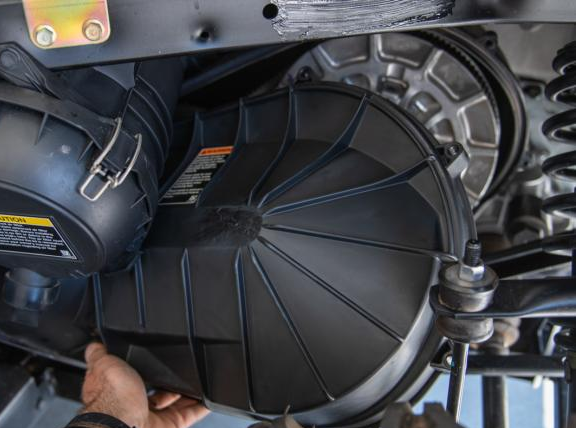
Locate and loosen all PVT (clutch housing) cover bolts. Remove them completely.
-
Carefully pull the cover straight outward to avoid damaging the existing gasket.
-
Remove the PVT duct clamp, if applicable to your model.
-
Inspect the cover seal (5526344). If the seal is cracked or flattened, you must replace it.
-
Torque spec on reassembly: $\mathbf{35 \text{ in-lbs}} \text{ (4 Nm)}$
-
Step 3: Release Belt Tension & Remove the Old Belt
-
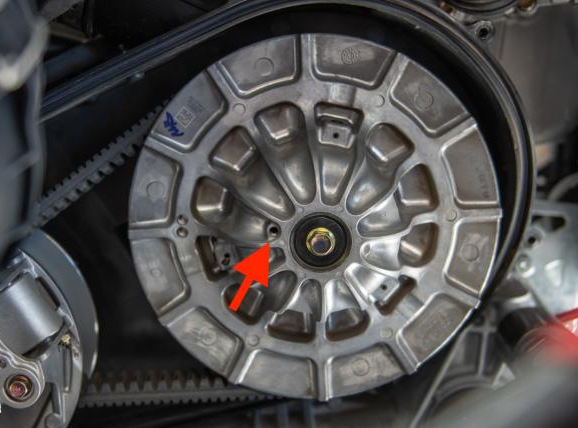
Insert the factory clutch spreader tool into the movable side (sheave) of the secondary clutch.
-
Turn the tool to spread the clutch sheaves apart and relieve the belt tension.
-
While maintaining the spread, rotate the belt and pull upward to slip it free from the secondary clutch.
-
Carefully walk the belt off the primary clutch. Avoid forcing or bending the belt sharply, as this may damage the delicate clutch faces.
Alternate Removal Method: On certain models, you may remove the secondary clutch entirely for easier access. Remove the secondary clutch bolt, slide the clutch off the shaft, and then remove the belt directly. This is optional but helpful if working space is tight.
Step 4: Inspect the System
Before installing a new belt, thoroughly inspect the used belt and the entire clutch system.
Drive Belt Inspection Criteria
You must replace the belt if you see any of the following:
-
Fraying or separated edges.
-
Hour-glassing (narrowing severely in the center).
-
Loose or exposed cords.
-
Missing cogs (the teeth on the inside).
-
Burn marks or glazing (shiny spots).
-
Deep abrasions or wear marks.
Housing & Clutch Inspection
-
Debris: Critically, remove all debris as noted in the safety section above.
-
Clutch Faces: Inspect the primary and secondary clutch sheaves for deep grooves, heat spots (bluish discoloration), or uneven wear.
-
Ducts: Ensure the air intake and exhaust ducts for the PVT system are not blocked.
Step 5: Install the New Belt
-
Check Direction: Verify the directional arrows printed on the new belt. The arrows must face forward (the direction of rotation).
-
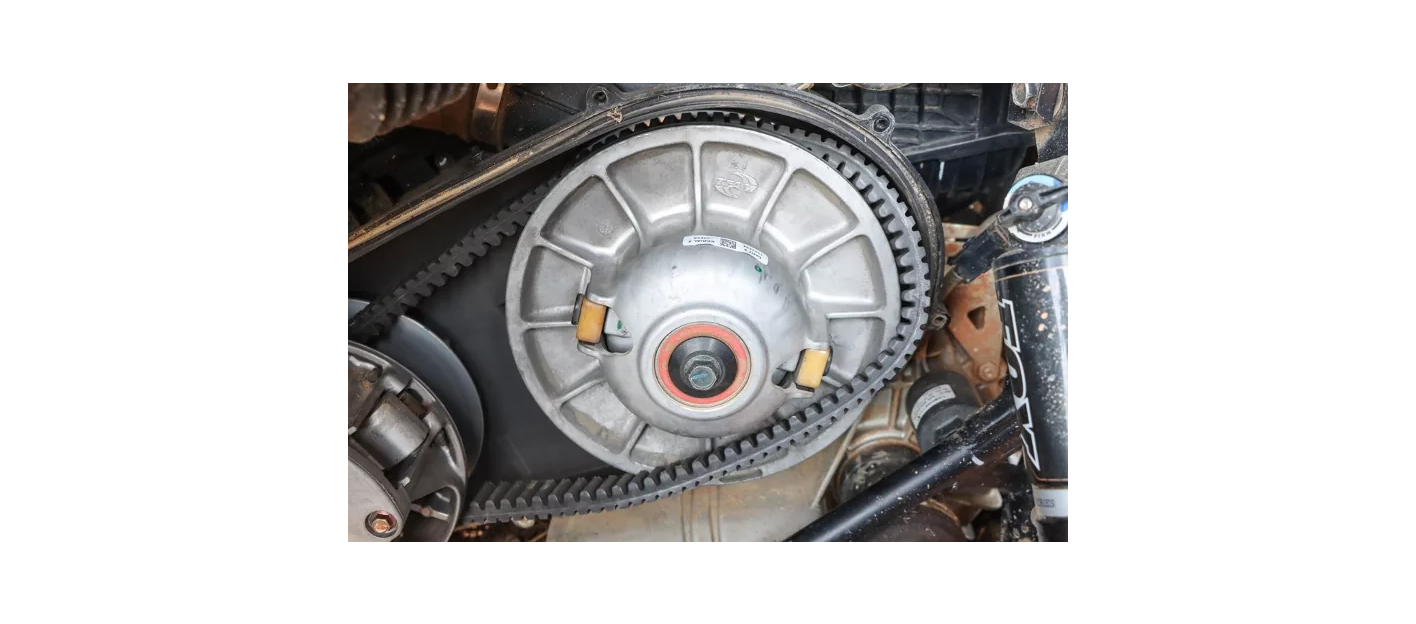
Primary Clutch First: Slide the new belt onto the primary clutch first.
-
Spread Secondary: Use the clutch spreader tool again to open the secondary sheaves wide.
-
Walk Into Place: Walk the belt into place around the secondary clutch.
-
Tip: Rotate the secondary clutch by hand while applying light downward pressure on the belt. This helps the belt seat properly deep within the sheaves.
-
Step 6: Reinstall the Clutch Cover
-
Seal Prep: Lightly grease the cover seal groove or gasket to help prevent binding upon reinstallation. Silicone spray can also be used for easier seating.
-
Position: Carefully position the cover and ensure the gasket stays fully seated in its groove.
-
Torque Bolts: Install all cover bolts and tighten them in a crisscross pattern to the specified torque:
-
Cover Bolts Torque Spec: $\mathbf{54 \text{ in-lbs}} \text{ (6 Nm)}$
-
PVT Intake Bracket (if removed): $\mathbf{8 \text{ ft-lbs}} \text{ (11 Nm)}$
-
Step 7: Final Checks & Break-In
-
Ensure all tools are removed from the clutch area.
-
Reinstall any seats or panels you removed earlier.
-
Break-In Procedure: The new belt requires a break-in period to ensure maximum life and performance.
-
Start the RZR in Neutral and let it idle for 3–5 minutes.
-
Gently rev the engine to help the new belt seat in the clutch grooves.
-
Perform a slow test drive—avoid heavy throttle or hard acceleration—for the first 10–15 minutes.
-
Replacing the Polaris RZR drive belt is a straightforward job when you follow the right steps and pay attention to crucial details like torque specs, belt direction, and clutch debris removal. Regular inspection and proactive replacement ensure your belt system stays reliable for every off-road adventure.